
Procedural City Tools
Generator
 Unreal Engine
 C++
C++Description
The city generator is a system that procedurally generates an infinite city using Data Assets built from the custom Tile Designer tool. Since gameplay takes place on a tram, the city moves around the player rather than the other way around. This avoids physics complications and floating point errors that would come with moving the player through a static world.
The city generator is highly optimized, using instanced rendering and merged meshes to minimize draw calls and maintain over 120fps even in non-packaged builds.
Technical Details
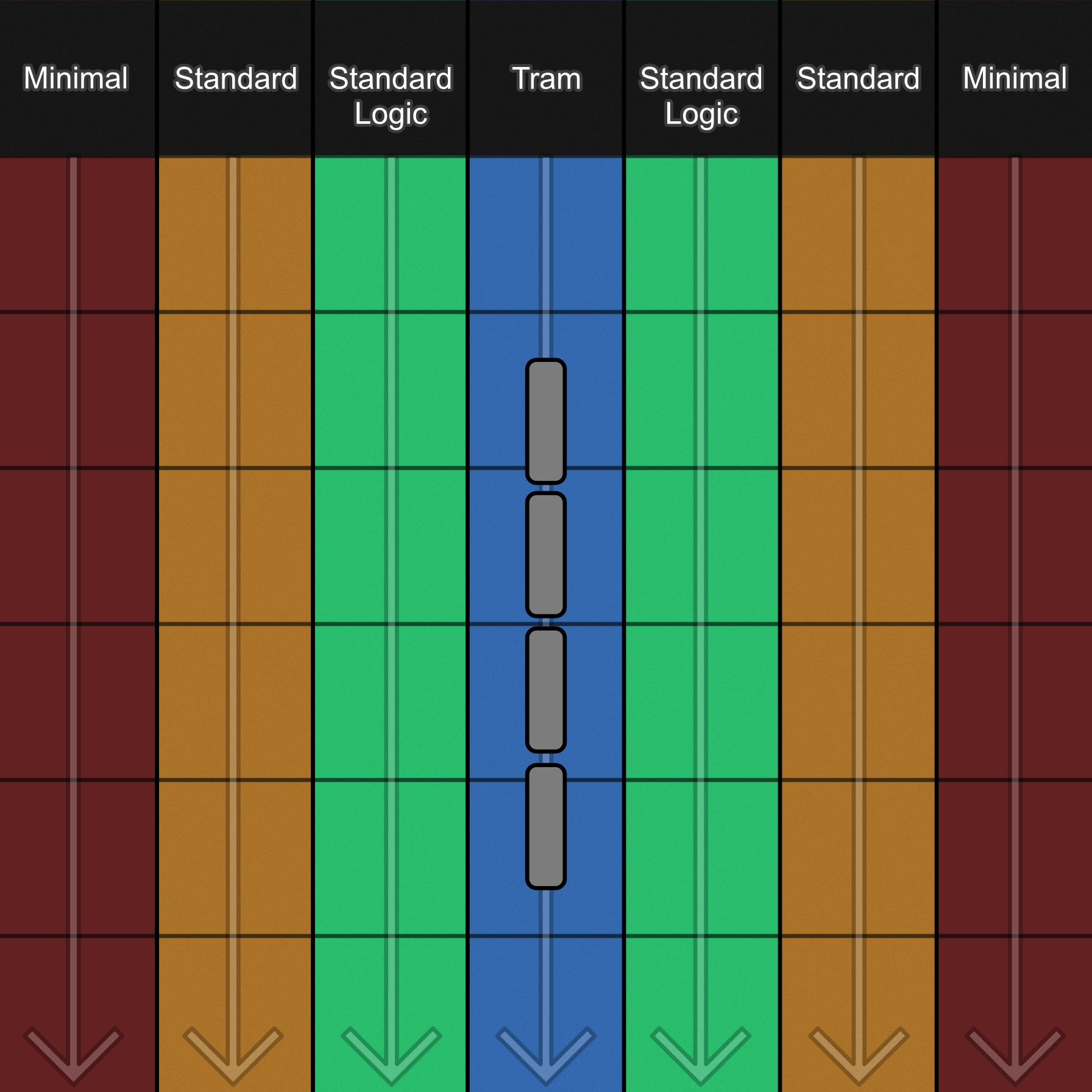
The city is divided into lanes, each lane is assigned a tile type:
Tram – The most detailed tile type. Supports logic actors that trigger SFX and VFX based on player proximity. Requires specific mesh placement to avoid intersecting with the tram path
Standard Logic – Detailed tiles with fewer meshes than tram tiles. Supports logic actors
Standard – Same as Standard Logic tiles, but without logic actors
Minimal – Strict polygon requirements and uses larger buildings designed to fill space and block sightlines to the sky edge
Before gameplay, the city generator collects all tile Data Assets and creates one Instanced Static Mesh component per asset. When a row spawns, it randomly selects an appropriate tile for its lane type and requests the corresponding ISM component to spawn an instance at that location. When a row’s offset exceeds the threshold distance, the generator finds ISM components that own any instances on that row, and removes the instances.
An early problem with the moving city was severe ghosting (or smearing), since the city is dark with bright light sources and constantly moving. After deep diving into the issue, it became clear that it was a UE5 bug where UpdateInstanceTransform wasn’t correctly populating the velocity buffer used for motion blur and AA calculations. The initial workaround was attaching a scene component to each ISM component to act as a mover, which forced the velocity buffer to be calculated correctly. Eventually, creating a custom C++ ISM subclass that calls and exposes necessary functions solved the issue by allowing per instance transforms by ID, correctly supplying the velocity buffer and eliminating the ghosting entirely.
Features
• Infinite City – city generates and streams endlessly at runtime, spawning and despawning rows dynamically as the city moves
• ISM Instancing – one ISM component per tile type keeps draw calls to 1 per unique tile, regardless of instance count
• Merged City Tiles – all building meshes in a tile are merged into a single mesh, turning hundreds of draw calls into a few
• Proximity Based Logic – sfx and vfx on supported tiles activate and deactivate based on player proximity
• Hand-crafted – all tiles are hand-crafted by an artist, giving the city a sense of intentional design rather than random generation.
• 120+ fps – fully streaming procedural city maintains a steady 120fps even in non-packaged builds
Tile Designer
Unreal EngineDescription
Tile Designer is a project-specific Unreal Engine Editor Utility Widget built to design and save city tile prefabs. Tiles are assembled directly in the editor viewport, then saved as Data Assets containing a merged static mesh and all relevant tile configurations, for the generator to use at runtime.
Technical Details
Meshes are placed and arranged on a city tile actor, and Tile Designer provides the tooling to manipulate them. On save, a fully automated pipeline takes over. All meshes on the city tile actor are merged into a single static mesh, and a Data Asset is created storing mesh instance data (what buildings were placed where), all tile settings (lane type, rotation rules, logic config, etc), and a reference to the merged mesh. Any existing tile can be loaded back into the designer at any time, reconstructing the full mesh layout for editing and re-saving.
Features
• Mesh Tools – pick, place, randomize and adjust height of meshes in the directly viewport
• Snap & Mirror – snap and mirror to the tile or desiner’s X/Y axes
• Tram View Toggle – visualize the tram path through the tile
• Load from Asset – load any existing tile Data Asset back into the designer for editing
• Automated Save Pipeline – automatically merge meshes, create Data Asset with tile settings, and place in folder hierarchy